> ## Documentation Index
> Fetch the complete documentation index at: https://docs.autocoder.cc/docs/llms.txt
> Use this file to discover all available pages before exploring further.
# Workspace — Manage Your AutoCoder.cc Projects & Apps
> Workspace is your central hub on AutoCoder.cc for managing every project you build — view drafts, track published applications, configure custom domains, organize liked projects, and jump back into any build.
The **Workspace** is your central hub in AutoCoder.cc. It is divided into four main sections: **Projects**, **Publish**, **Domains**, and **Likes**.
***
## Projects
The **Projects** tab displays all your creative drafts and completed projects.
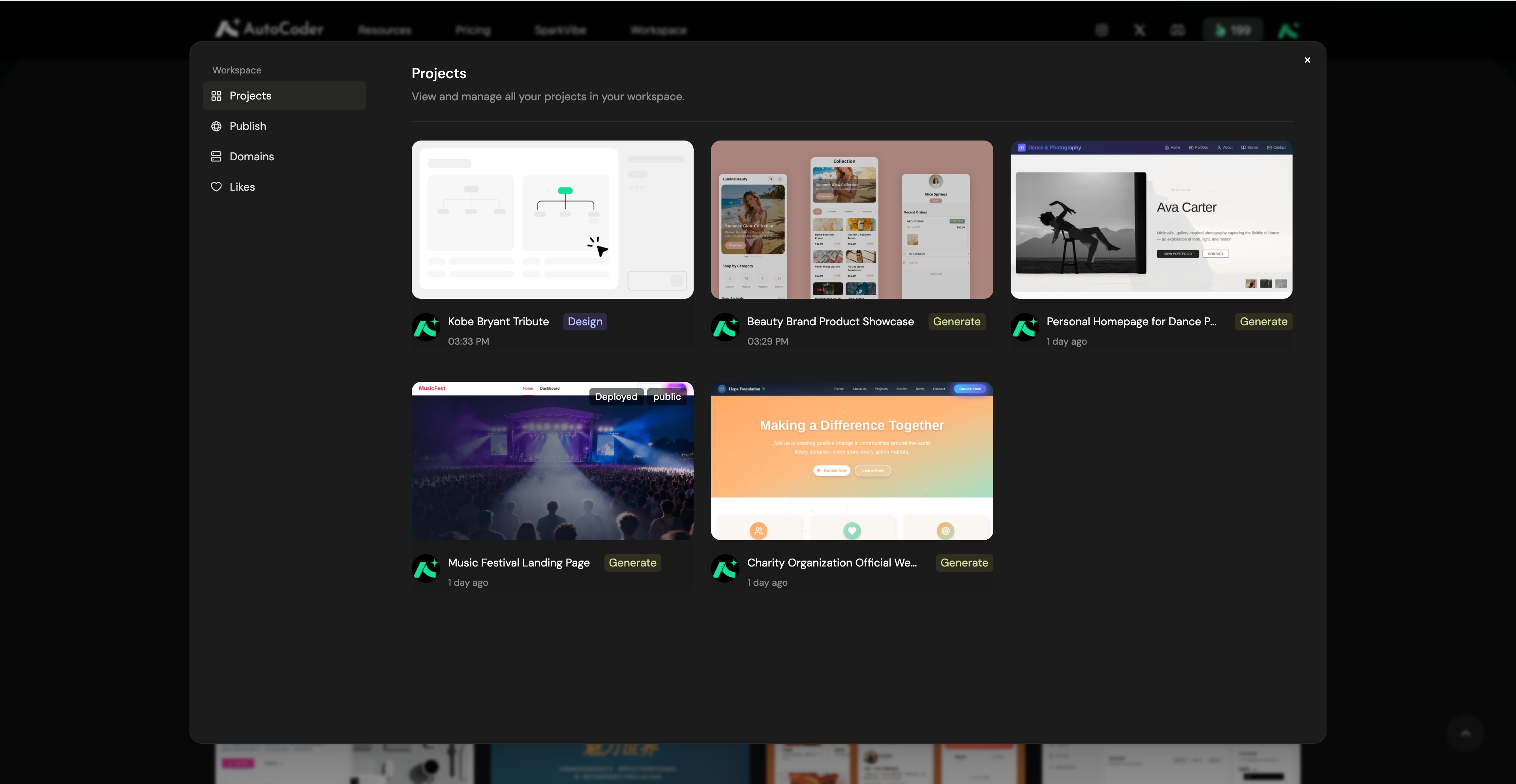 Clicking on any project card will take you back into the AutoCoder.cc editor, where you can continue building and refining your application using natural language.
***
## Publish
The **Publish** tab provides a comprehensive overview of all your live applications and their current health status.
Clicking on any project card will take you back into the AutoCoder.cc editor, where you can continue building and refining your application using natural language.
***
## Publish
The **Publish** tab provides a comprehensive overview of all your live applications and their current health status.
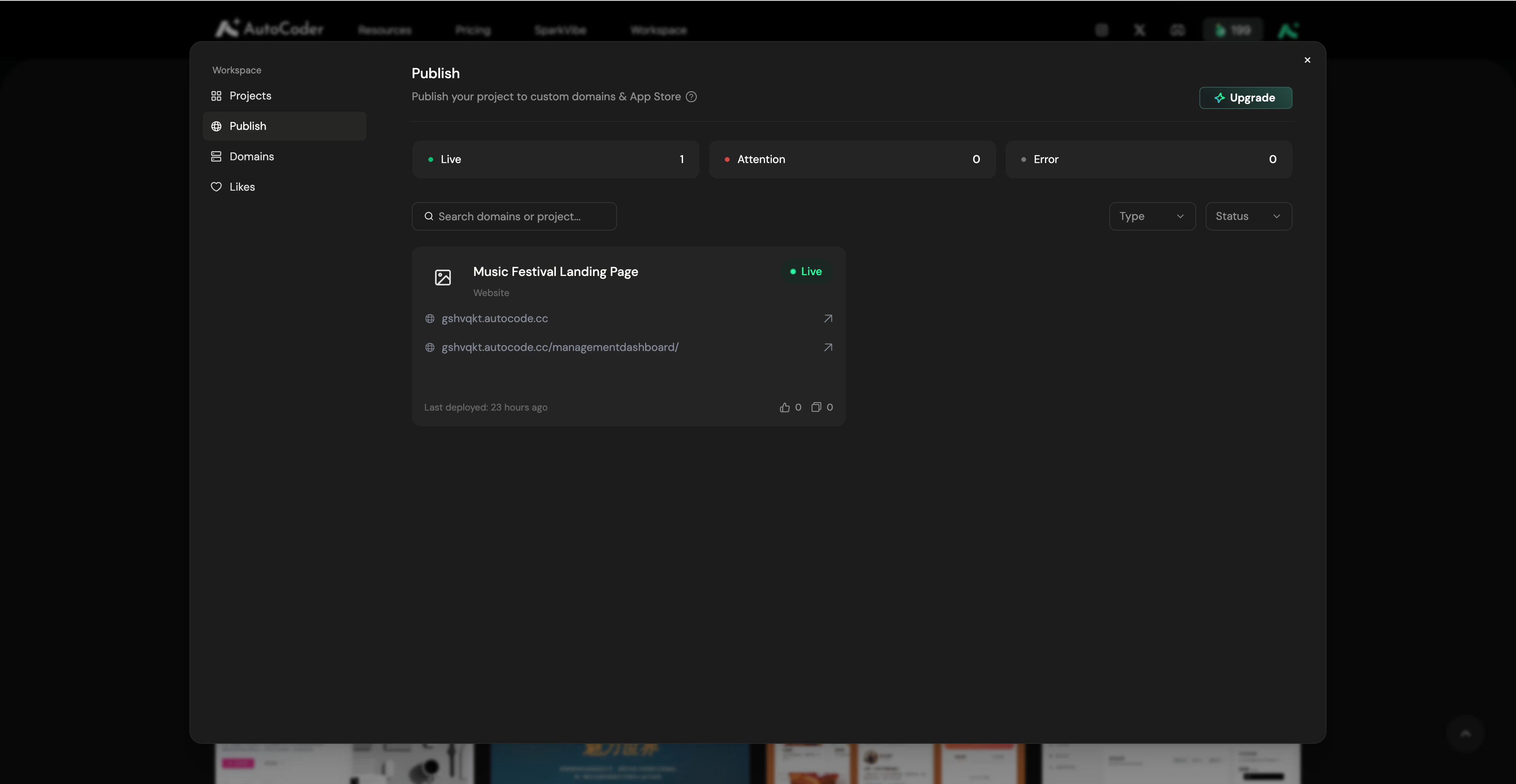 From the overview page, you can view your project's live status, quickly copy your public Website URLs, access your Backend Dashboard.
Clicking on any specific project card will open the **Project Publish** detail page, which is split into two configurations:
### Website Publish
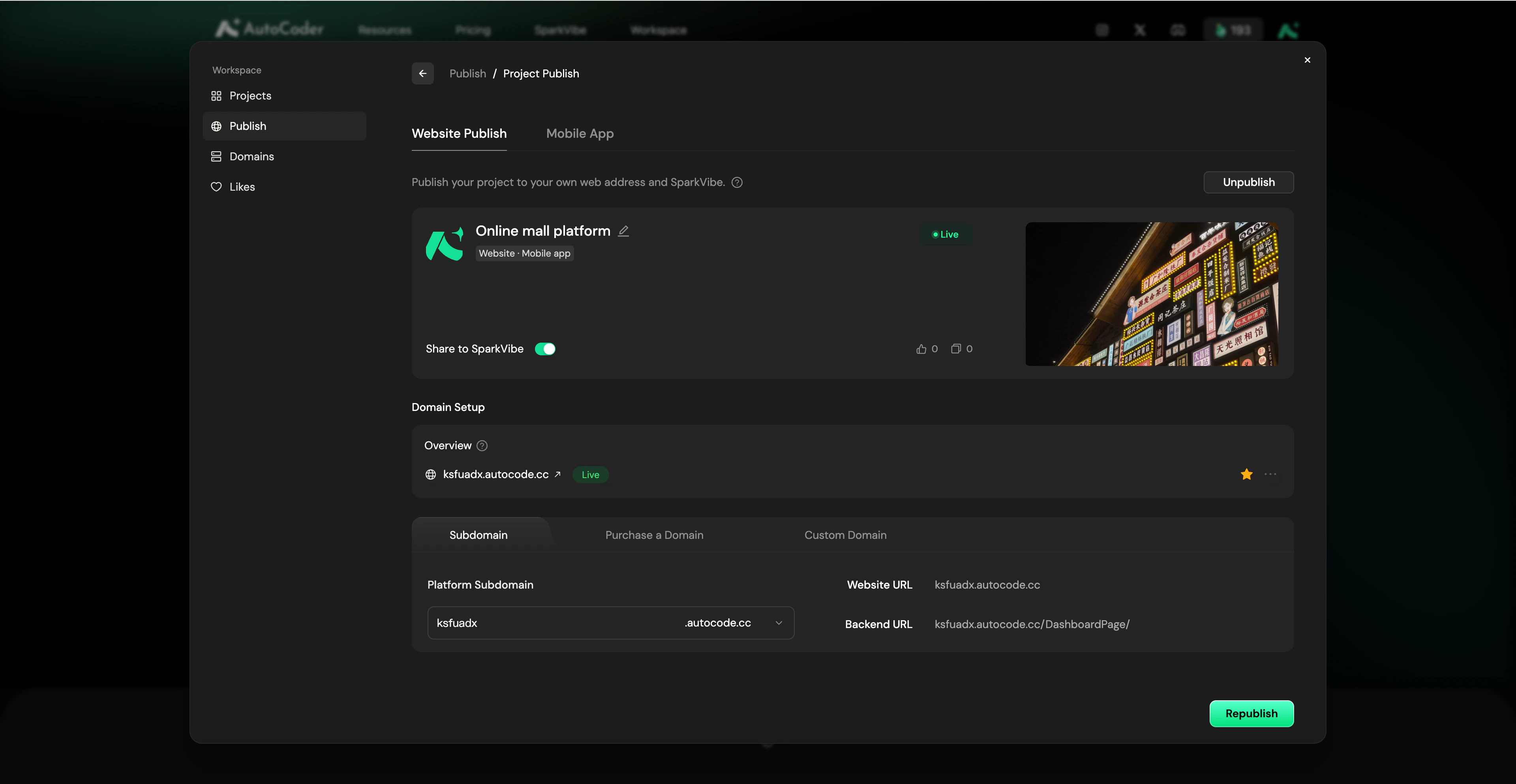
Publish your project to your own web address and SparkVibe.
**Project basic information**
* **Project details**: View your project name, cover image, and current deployment status (e.g., Live). You can click **Unpublish** in the top right to temporarily take the project offline.
* **Share to SparkVibe**: Toggle this switch to make your project publicly visible in the SparkVibe community, allowing others to view and remix your work.
**Domain management**
* **Domain Setup**: Manage your access addresses. You can configure your free platform **Subdomain**, **Purchase a Domain**, or bind a **Custom Domain**.
* **Access URLs**: Quickly copy your generated frontend **Website URL** and the management **Backend URL**.
* **Republish**: Click this button to instantly push your latest code updates to the live website.
From the overview page, you can view your project's live status, quickly copy your public Website URLs, access your Backend Dashboard.
Clicking on any specific project card will open the **Project Publish** detail page, which is split into two configurations:
### Website Publish
Publish your project to your own web address and SparkVibe.
**Project basic information**
* **Project details**: View your project name, cover image, and current deployment status (e.g., Live). You can click **Unpublish** in the top right to temporarily take the project offline.
* **Share to SparkVibe**: Toggle this switch to make your project publicly visible in the SparkVibe community, allowing others to view and remix your work.
**Domain management**
* **Domain Setup**: Manage your access addresses. You can configure your free platform **Subdomain**, **Purchase a Domain**, or bind a **Custom Domain**.
* **Access URLs**: Quickly copy your generated frontend **Website URL** and the management **Backend URL**.
* **Republish**: Click this button to instantly push your latest code updates to the live website.
 ### Mobile
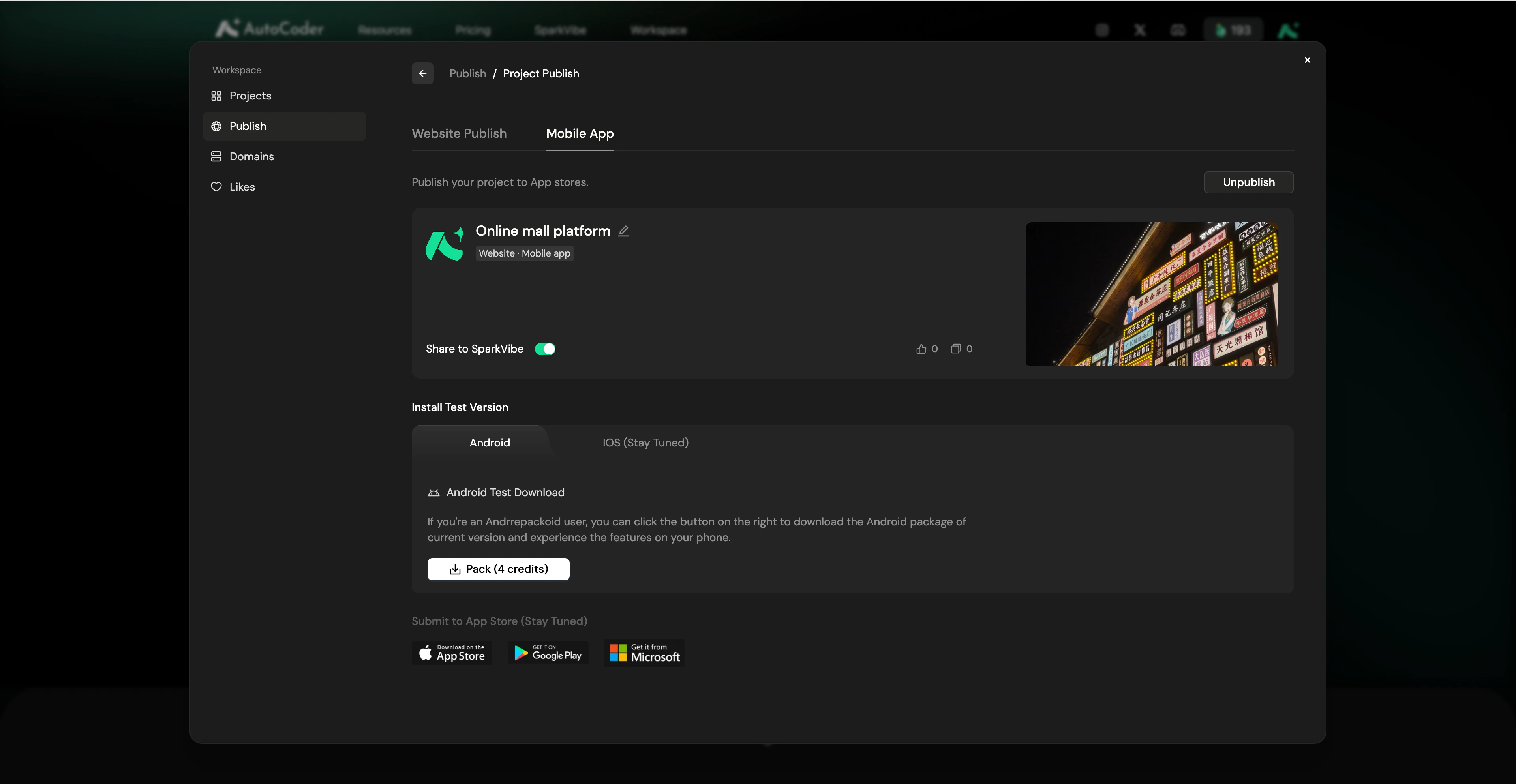
Publish your project to App stores.
**Project basic information**
* **Project details**: View your project name, cover image, and current status. Click **Unpublish** in the top right to temporarily take the project offline.
* **Share to SparkVibe**: Toggle this switch to make your project publicly visible in the SparkVibe community.
**App download**
* **Android Test Download**: In the **Android** tab, click the **Pack** button (this consumes credits) to generate your installation package. Once packed, you can download the APK or scan the QR code to install and test the app directly on your phone.
* **iOS & App Store**: iOS test versions and direct native submissions to official app stores (Apple App Store, Google Play, Microsoft Store) are currently under development (Stay Tuned).
### Mobile
Publish your project to App stores.
**Project basic information**
* **Project details**: View your project name, cover image, and current status. Click **Unpublish** in the top right to temporarily take the project offline.
* **Share to SparkVibe**: Toggle this switch to make your project publicly visible in the SparkVibe community.
**App download**
* **Android Test Download**: In the **Android** tab, click the **Pack** button (this consumes credits) to generate your installation package. Once packed, you can download the APK or scan the QR code to install and test the app directly on your phone.
* **iOS & App Store**: iOS test versions and direct native submissions to official app stores (Apple App Store, Google Play, Microsoft Store) are currently under development (Stay Tuned).
 ***
## Domains
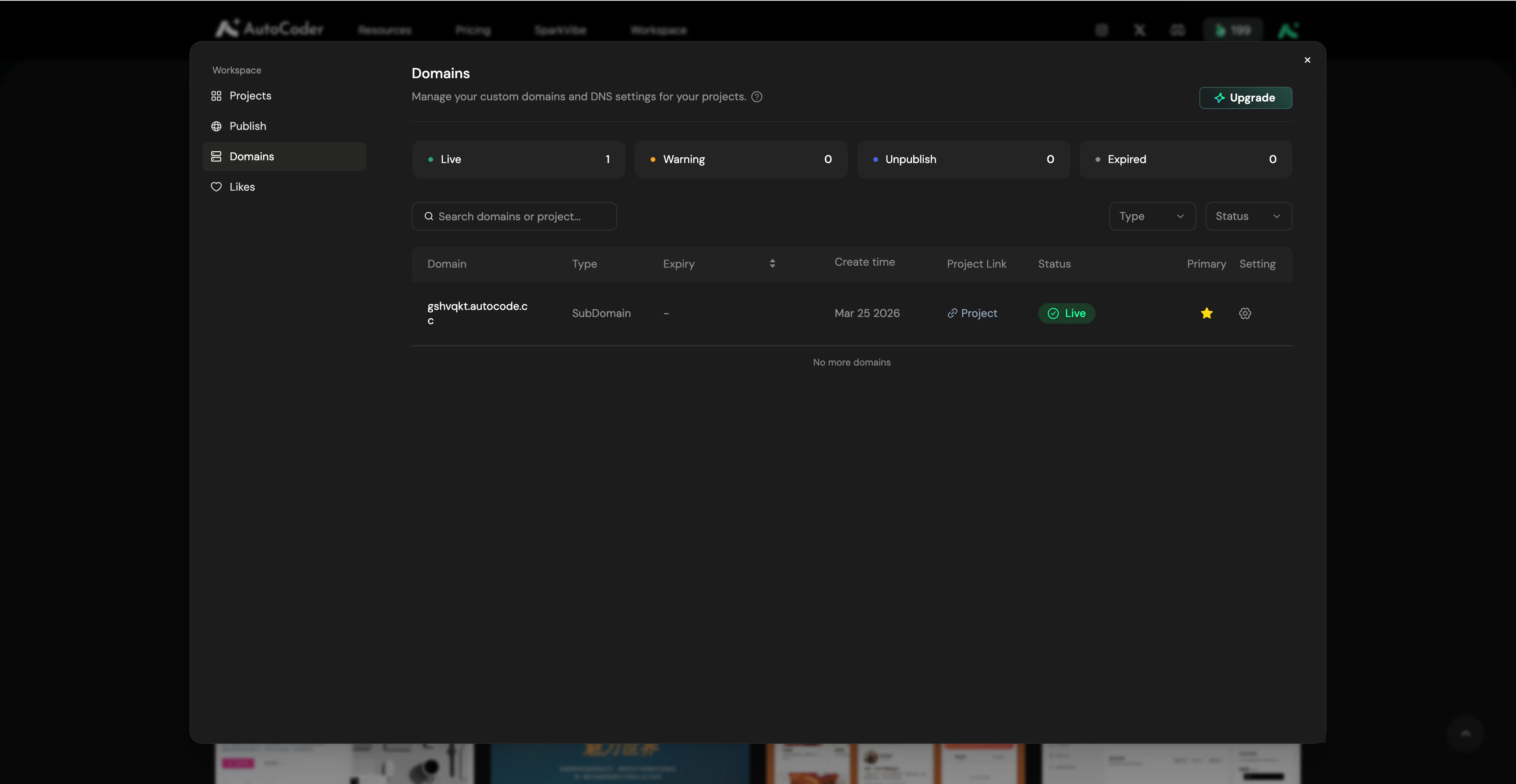
The **Domains** tab allows you to centrally monitor and manage all URLs bound to your projects.
***
## Domains
The **Domains** tab allows you to centrally monitor and manage all URLs bound to your projects.
 ### Domain Status
The top overview cards display the real-time health of your domains based on four categories:
* **🟢 Live**: The domain is active and functioning normally.
* **🟠 Warning**: The domain or SSL certificate is expiring soon.
* **🔵 Unpublish**: The domain is not bound to a project.
* **⚫️ Expired**: The domain subscription or SSL certificate has expired.
### Management & Primary Domain (Pro feature)
If you bind multiple domains to a single project, you can designate one as the **Primary Domain** in the Publish Project settings. All traffic from other alias domains will automatically redirect to your Primary Domain.
Click the **Setting (Gear)** icon next to any domain to manage renewals, update SSL certificates, or unbind the domain from its current project.
***
## Likes
The **Likes** tab acts as your personal inspiration library. Any project you have liked in the **SparkVibe** community is automatically saved here.
### Domain Status
The top overview cards display the real-time health of your domains based on four categories:
* **🟢 Live**: The domain is active and functioning normally.
* **🟠 Warning**: The domain or SSL certificate is expiring soon.
* **🔵 Unpublish**: The domain is not bound to a project.
* **⚫️ Expired**: The domain subscription or SSL certificate has expired.
### Management & Primary Domain (Pro feature)
If you bind multiple domains to a single project, you can designate one as the **Primary Domain** in the Publish Project settings. All traffic from other alias domains will automatically redirect to your Primary Domain.
Click the **Setting (Gear)** icon next to any domain to manage renewals, update SSL certificates, or unbind the domain from its current project.
***
## Likes
The **Likes** tab acts as your personal inspiration library. Any project you have liked in the **SparkVibe** community is automatically saved here.
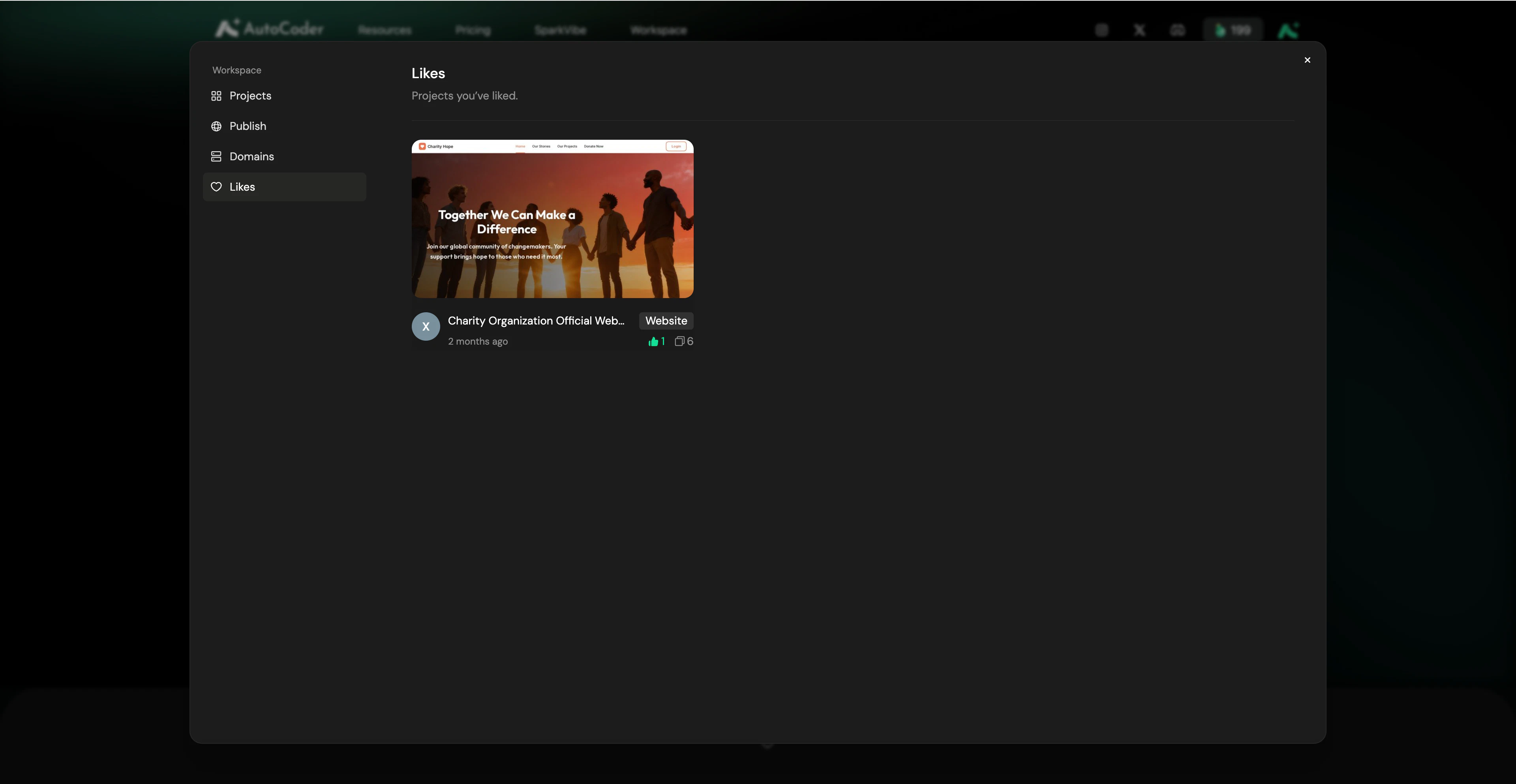 You can revisit these projects at any time. If you want to use a liked project as a template, simply open it and select **Remix** to clone it directly into your own **Projects** tab for further development.